One live record for every project we build.
Our teams plan and record the work in it, our clients follow their project and approve what we need from them, and our managers use it to look after the people on site. These are its screens, and what each one is for.
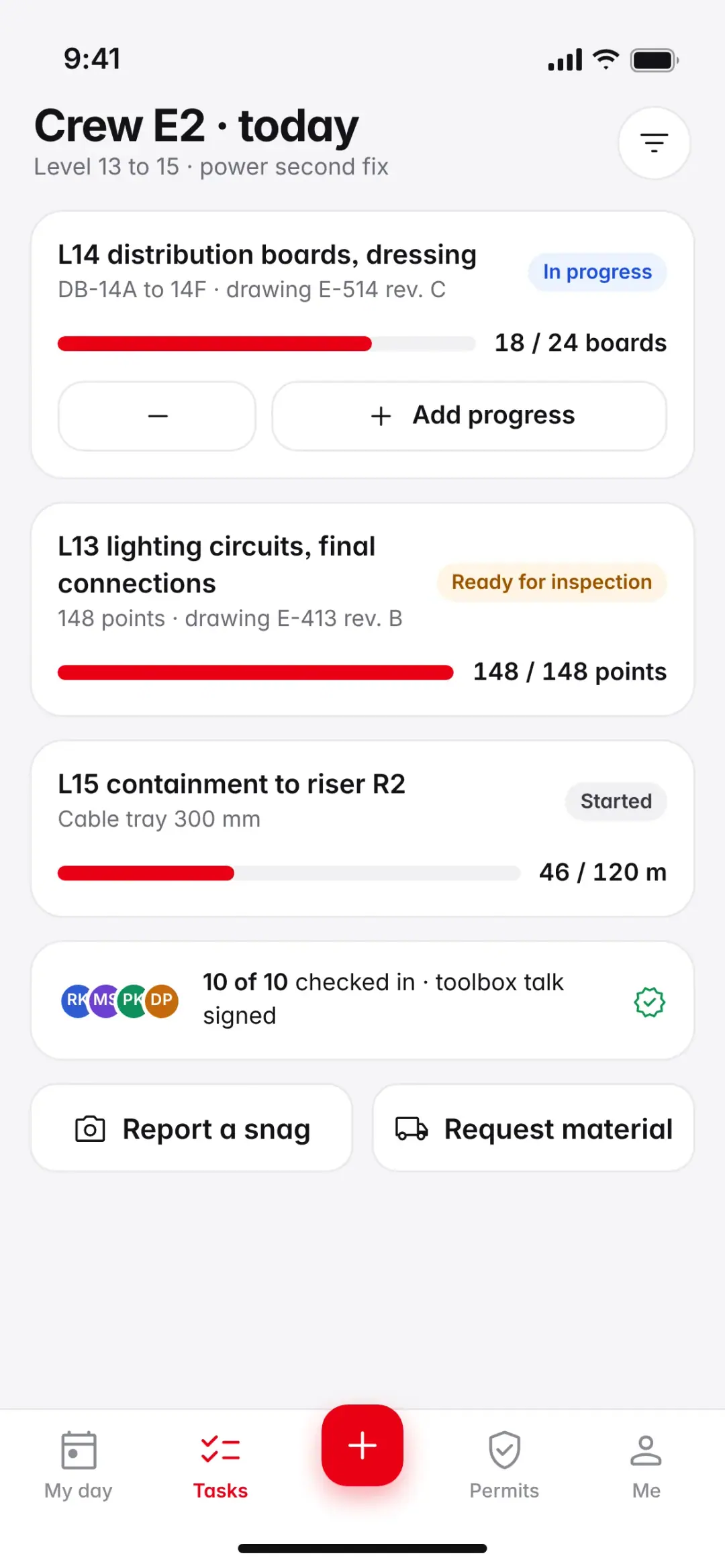
The client’s overview on a laptop, the client app, and a site technician’s morning. Select a screen to enlarge it.
- 12live projects, each with its own portal space
- 120engineers who plan and record the work in it
- 900site workforce, inducted and signed in through it
- 3ISO-certified systems our records are kept to: 9001, 14001 and 45001
Your project, open to you from the first week on site.
Every client gets their own sign-in on day one. The overview shows where the project stands this morning, and every figure on it opens the records behind it.
- Where it stands todayInstalled, programme, first-time inspection pass rate, what is waiting for you and safe man-hours, updated from site each morning.
- Planned against actualThe installation curve against the baseline programme, with progress by system beside it.
- The latest from sitePhotos and 360° walks, each with the time, the floor and the engineer who took it.
- Waiting for your decisionSubmittals, inspections and variations that need you, each with the date it is due.
The programme, week by week.
Every activity against the baseline, with the critical path, the authority inspections and the float left to handover. When something slips, you see it the same week, with the reason and the plan to recover it.
- Gantt chart by floor and system, updated every week
- Critical path and float to handover
- DEWA, Civil Defence and other authority inspections, booked and tracked
See the site without going to site.
Cameras on the work fronts, a 360° walk of every floor, drone surveys and readings for heat, dust and noise. Everything is dated, so you can see how any area looked on any day.
- Live views and time-lapse of each work front
- 360° walks, floor by floor, week by week
- Photos on the phone, sorted by floor and system
Approve submittals and inspections from anywhere.
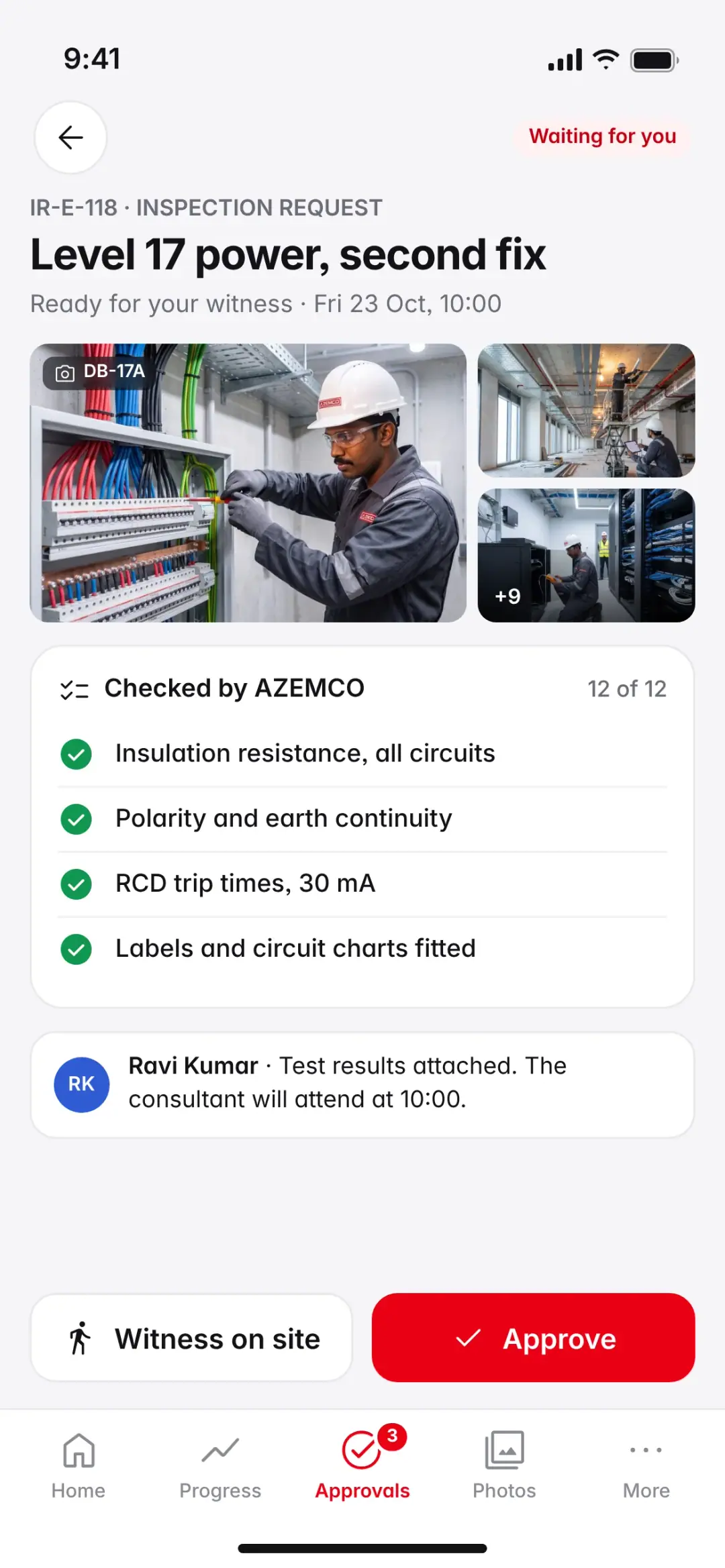
Each request arrives with its documents, the consultant’s comments and our engineer’s check against the specification. Approve, comment or reject on the web or the phone; each decision is kept with the name and the time.
- Material submittals, inspection requests and variations
- Checked against the specification by our engineer before it reaches you
- A full history of every decision
Reports you don’t have to ask for.
The portal is live, but some things need a date and a signature. These reports reach you on a fixed rhythm, and every one stays filed in the portal for the life of the building.
- LiveThe portal and the appProgress, photos, inspections and approvals, the moment they are recorded.
- Every daySite diary and photosManpower, work done, deliveries, weather and issues, with the day’s photos, sent at 18:00.
- Every weekProgress report and look-aheadProgress by system, the next three weeks, risks and the decisions we need, every Monday by 09:00.
- Every monthMonthly reportProgramme, cost and variations, quality, safety and the payment application.
- Each milestoneTest records and the handover fileInspection and test certificates, as-built drawings and O&M manuals, filed as each system is finished.


A sample weekly reportWeek 42 on the sample project: summary, progress by system, look-ahead, photos, inspections and safety.Download the PDF, 3 pages
Every report in one place, and answers from them.
Daily diaries, weekly and monthly reports, test records and safety statistics, filed by date. Ask a question in plain words, such as “Which inspections failed this month, and why?”, and get an answer with links to the records it came from.
- Sent to the people you choose, and kept in the portal
- Every figure traced to the record behind it
- Answers from your own project’s records, checked by our engineers
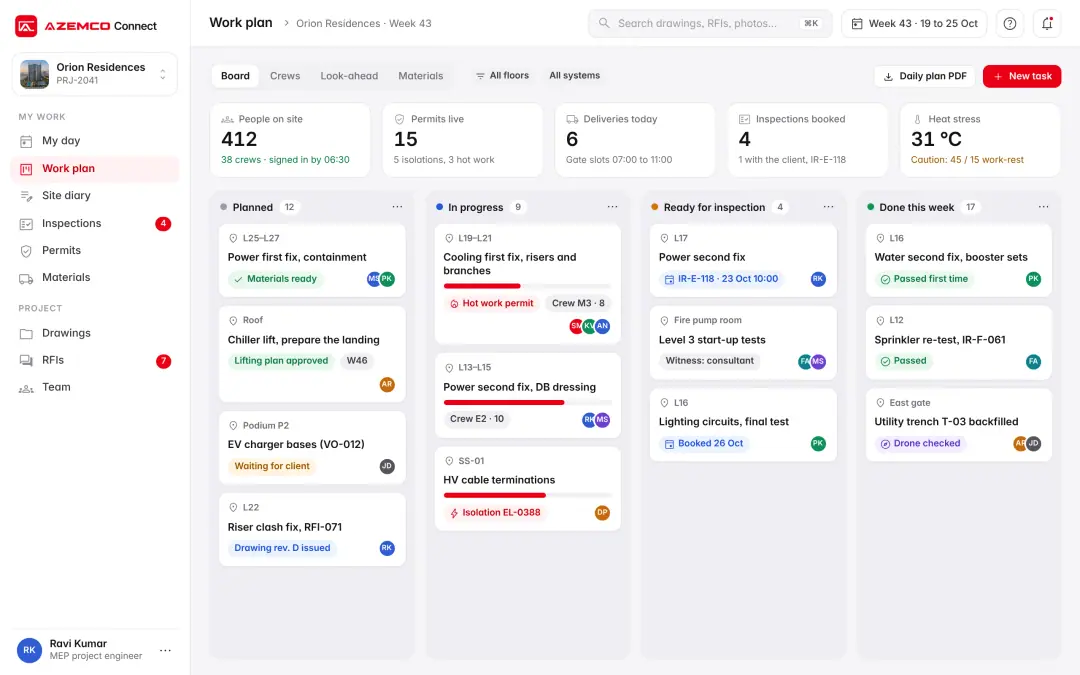
Every task planned, briefed, permitted, built and checked.
Our engineers plan three weeks ahead from the programme. Each morning the crews get their tasks, permits and toolbox talk on their phones; each evening the work done is recorded and inspected.
- 01PlanA three-week look-ahead from the programme, by floor and crew.
- 02BriefA toolbox talk at the start of each shift, in the crew’s own language.
- 03PermitDigital permits for hot work, height and isolations, checked and signed on site.
- 04BuildCrews record progress and photos on their phones, against the drawing.
- 05InspectOur engineer checks the work, then raises the inspection request.
- 06RecordTest results, photos and as-built drawings go straight into the handover file.
- PlannedThis week’s tasks from the look-ahead, each with its location, crew and drawing.
- In progressProgress from the crews’ phones, with the permit that covers each task.
- Ready for inspectionChecked by our engineer and booked with the consultant or the client.
- Done this weekInspected, passed and filed, with the result kept for handover.
My dayCheck-in at the gate, the morning toolbox talk in Tamil, and a heat caution for the afternoon.Site technician
Crew tasksThe crew’s tasks for the day, with progress counted in boards, points and metres.Site supervisor
Hot-work permitPrecautions checked, photos of the area and three signatures before the work starts.Site supervisor
Every person on our sites: inducted, qualified, accounted for.
Each morning our managers see who is on site, what each crew installed against plan, whose certificates need renewing, and how safety and welfare are holding up on every project.
- Who is on siteSigned in at the gate with a site card or QR code, against the roster for each site.
- Output, measured by tradeInstalled quantities against plan. Below 95%, we look at materials, access and drawings first.
- CompetenceLicences, cards and trade tests, with renewals booked before they lapse.
- Safety and welfarePPE checks, observations closed, rest cycles in the heat, transport, water and shade.
What we record, and why.
Workforce data is used for safety, competence, pay and welfare, and nothing else.
What we record
- Sign-in and sign-out at the site gate
- Hours worked, so that pay is right and goes through the Wage Protection System
- Training, licences and medical fitness dates
- Safety observations, permits and incidents
- Work done by each crew, from installed quantities
What we don’t
- Location outside the site boundary or after work
- Cameras in rest areas, prayer rooms or accommodation
- Face or fingerprint scans to sign in
- Decisions about a person from a camera alone
Who sees it
- Each worker sees their own record, in their own language
- Supervisors see their own crews
- Clients see totals for their project, never personal records
- Any worker can ask for a record to be corrected
Handled under the UAE Personal Data Protection Law, Federal Decree-Law No. 45 of 2021. Workers are told what is recorded and why, in their own language, when they join.
From the work front to your screen, the same day.
One inspection, followed through the portal.
- 10:40Recorded on siteThe crew finishes the second fix on level 17 and records it on the phone, with photos, against the drawing.
- 13:15Checked by our engineerOur engineer tests the circuits, attaches the results and raises the inspection request.
- 16:05Seen by you, the same dayYou get the request on the app, with the results and photos, and approve it or book to witness it.


Suppliers work in the same system as our buyers.
Registered suppliers see their purchase orders, deliveries, invoices and payments, and quote for our tenders, in their own part of the portal.
- Each invoice followed from receipt to payment
- New orders to accept, or a delivery date to propose
- Tender invitations in your trades, with every clarification shared
Three ways in, each with two-step sign-in.
Clients, suppliers and our own staff each have their own sign-in. Each person sees only what their role needs, and every action is logged.
- Who
- Invited by your AZEMCO project manager
- How
- Email and password or a passkey, then a code
- Sees
- Your own projects only
- Who
- Registered companies, approved by our procurement team
- How
- Email and password or a passkey, then a code
- Sees
- Your own orders, invoices and tenders
- Who
- Employees with a company account
- How
- Microsoft single sign-on, on a company device
- Sees
- The projects and records their role needs
- Two-step sign-inOn every account, with passkeys on phones and laptops.
- Access by roleEach person sees only the projects and records their role needs.
- A full audit trailEvery view, approval, download and change is logged with the name and the time.
- EncryptedData is encrypted in transit and at rest, and backed up every day.
- Held in the UAEProject data is held in UAE data centres.
- Yours at handoverThe whole record is exported to you: drawings, tests, certificates, photos and manuals.
More screens from the portal.
Select a screen to see it full size.
Questions about the portal
Who can see my project?
Your own team, the consultant and the AZEMCO people working on the project, each with the access their role needs. Other clients never see it, and we can show you the access list at any time.
Can we see the portal before we appoint you?
Yes. We will walk you through it on the sample project shown here, or on a live project with that client’s permission.
How often do the reports come?
A site diary every working day, a progress report every Monday, and a monthly report with the payment application. The portal itself is live.
Does it work on the phone?
Yes. Approvals, photos, inspections and reports work on the phone as they do on the web.
What do you record about the people on site?
Gate sign-in and sign-out, hours, training and certificates, safety records and the work each crew installs. It is used for safety, competence, pay and welfare, under the UAE Personal Data Protection Law.
Do you track workers off site?
No. Location is checked at the site gate only, never off site or after work.
What happens to the records at handover?
The whole record is exported to you: drawings, test certificates, photos, O&M manuals and the asset register, in formats your facilities team can use.
What feeds the record.


See your own project in AZEMCO Connect.
We will walk you through the portal on a live project: the programme, the site, the reports and the handover record.